
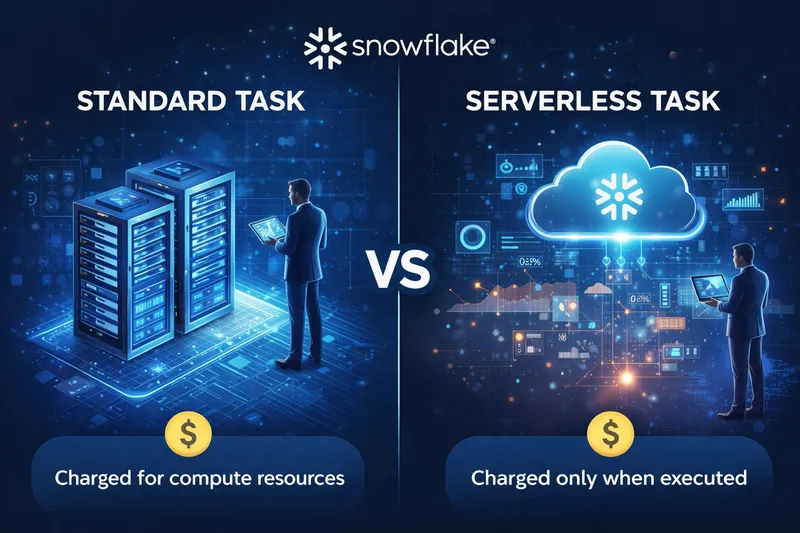
In the world of data engineering, the ability to efficiently manage workflows—especially when dealing with large, unpredictable datasets—is critical. Serverless tasks in Snowflake have emerged as a highly effective solution, allowing data teams to scale and execute tasks without the overhead of managing virtual warehouses directly. If you’re aiming to optimise runtime and enhance concurrency, Snowflake’s serverless tasks could be exactly what you need.
What Are Snowflake Serverless Tasks?
Snowflake serverless tasks offer an on-demand compute solution designed to automate scheduled or event-driven tasks without requiring a dedicated virtual warehouse. This feature allows you to schedule SQL-based tasks or combine multiple tasks into complex workflows (DAGs) with highly variable demands, all while avoiding the need to manually configure and allocate compute resources.
Key Benefits of Snowflake Serverless Tasks
- Automatic Scaling: Serverless tasks automatically scale to handle workload demands, providing more resources for complex tasks or larger data volumes without manual intervention. This dynamic scaling is ideal for workflows that experience irregular spikes in demand.
- Optimised for Concurrency: Traditional warehouse management often struggles with high concurrency requirements. Snowflake serverless tasks are designed to handle concurrent executions seamlessly. For instance, configuring tasks to run up to 100 instances in parallel allows for efficient processing of large datasets, dramatically reducing total runtime.
- Reduced Management Overhead: Unlike traditional compute setups where resource management and scaling require close monitoring, serverless tasks eliminate the need for such maintenance. This frees up your team to focus on high-value analytics rather than infrastructure management.
- Cost Efficiency: With serverless tasks, you only pay for the exact compute time consumed. This is especially beneficial for workloads with fluctuating demands, as you avoid the cost of idle resources.
Serverless Tasks in Action: A Real-World Example
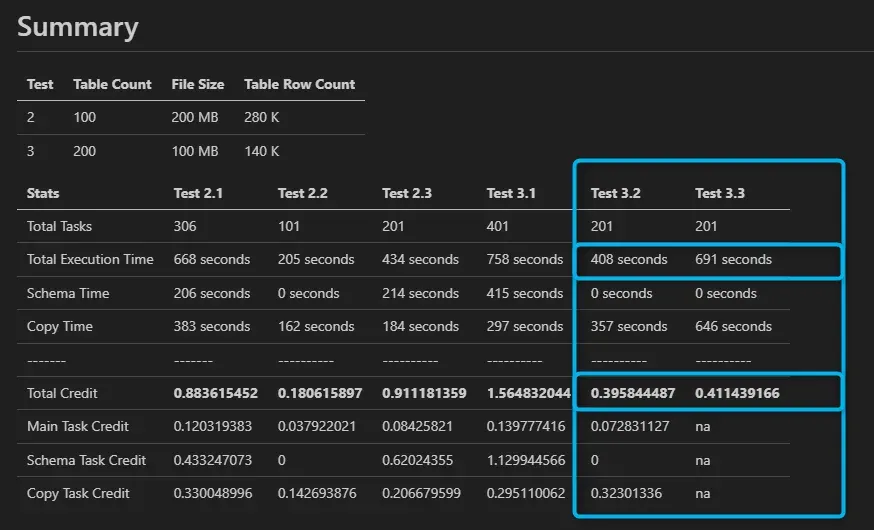
To highlight the efficiency of Snowflake serverless tasks, we tested their performance by ingesting 200 tables from an Azure Data Lake into Snowflake using our JCA Dynamics 365 Connector. Each table held approximately 140,000 rows, stored as 100MB CSV files. Our goal was to compare the performance and cost of serverless tasks against a dedicated virtual warehouse for this high-concurrency workload.
Initial Results with a Dedicated Virtual Warehouse
Using a dedicated Extra Small (XS) virtual warehouse, we configured the process to handle 30 tables concurrently. This setup was stable but reached its limit quickly.
When we attempted to increase the concurrency to 50 tables on the same XS warehouse, severe queuing and blocking occurred. This caused the overall process to take four times longer than the 30-table setup. To overcome this, we would have needed to upgrade to a larger (and more expensive) warehouse size.
Improved Results with Serverless Tasks
To overcome these limitations, we switched the process to use Snowflake’s serverless tasks. With an initial size of XS, we were able to process 100 tables concurrently without any queuing. The serverless infrastructure automatically scaled up to meet the massive concurrent demand and scaled down immediately after the tasks finished.
Test Results Comparison
- Serverless Tasks: Processed 100 tables concurrently.
- Dedicated XS Warehouse: Processed 30 tables concurrently.
Key Findings
The serverless task configuration proved to be 41% faster and 3.8% cheaper than the dedicated XS virtual warehouse. By adjusting compute resources dynamically based on real-time demand, serverless tasks provided both superior performance and better cost-efficiency.
Getting Started with Snowflake Serverless Tasks
Setting up serverless tasks is straightforward:
- Define Your Task: Use Snowflake’s SQL-based task creation. Instead of the traditional
WAREHOUSEparameter, useUSER_TASK_MANAGED_INITIAL_WAREHOUSE_SIZEto define the starting compute size. - Optimise for Parallel Execution: Break down larger workflows into discrete tasks that can run in parallel. Take full advantage of Snowflake’s ability to handle concurrent processes.
- Monitor and Adjust: While serverless tasks minimise manual intervention, it’s still helpful to monitor performance. Snowflake’s
TASK_HISTORYandSERVERLESS_TASK_HISTORYviews offer great insights into runtimes and usage patterns.
For more technical details, refer to the Snowflake Documentation.
Conclusion
Snowflake serverless tasks provide an efficient way to streamline workflows, reduce runtime, and support high concurrency. By minimising management overhead and scaling dynamically, they allow data teams to focus on delivering value. Whether you’re running daily ETL jobs or processing extensive datasets on demand, serverless tasks offer a scalable and cost-effective path forward.
Special Thanks
A special thanks to Regan Murphy from Snowflake for his invaluable insights on Serverless Tasks. His guidance helped us unlock new levels of efficiency and performance in our workflows.